

For most organisations using Salesforce, there is no dearth of data. It’s available on Salesforce reports, dashboards, forecasts, and customer records. The bigger challenge is clarity. Information is fragmented across tools, making it very difficult to connect insights with actual revenue outcomes and business actions. Sales, marketing, finance, and customer success often operate with different metrics and different interpretations of the same data. The solution - a well-designed decision layer on Salesforce that helps bridge this gap by connecting reporting, analytics, and execution into a unified framework. In this article, we will understand what this decision layer is, its benefits, and how to build one successfully in your organisation

What is the Decision Layer in Salesforce?
The Decision Layer in Salesforce is the intelligence layer that turns the raw Salesforce data into actionable business decisions. Instead of simply storing sales and operational data, this layer connects your ‘data’ and ‘decision-making’.
Traditionally, businesses using Salesforce relied heavily on pre-built dashboards and static reports that primarily focused on historical performance data. The Decision Layer changes this by making reporting more outcome-driven and actionable through capabilities such as Salesforce Reports, Revenue Analytics, AI-powered insights, and automation.
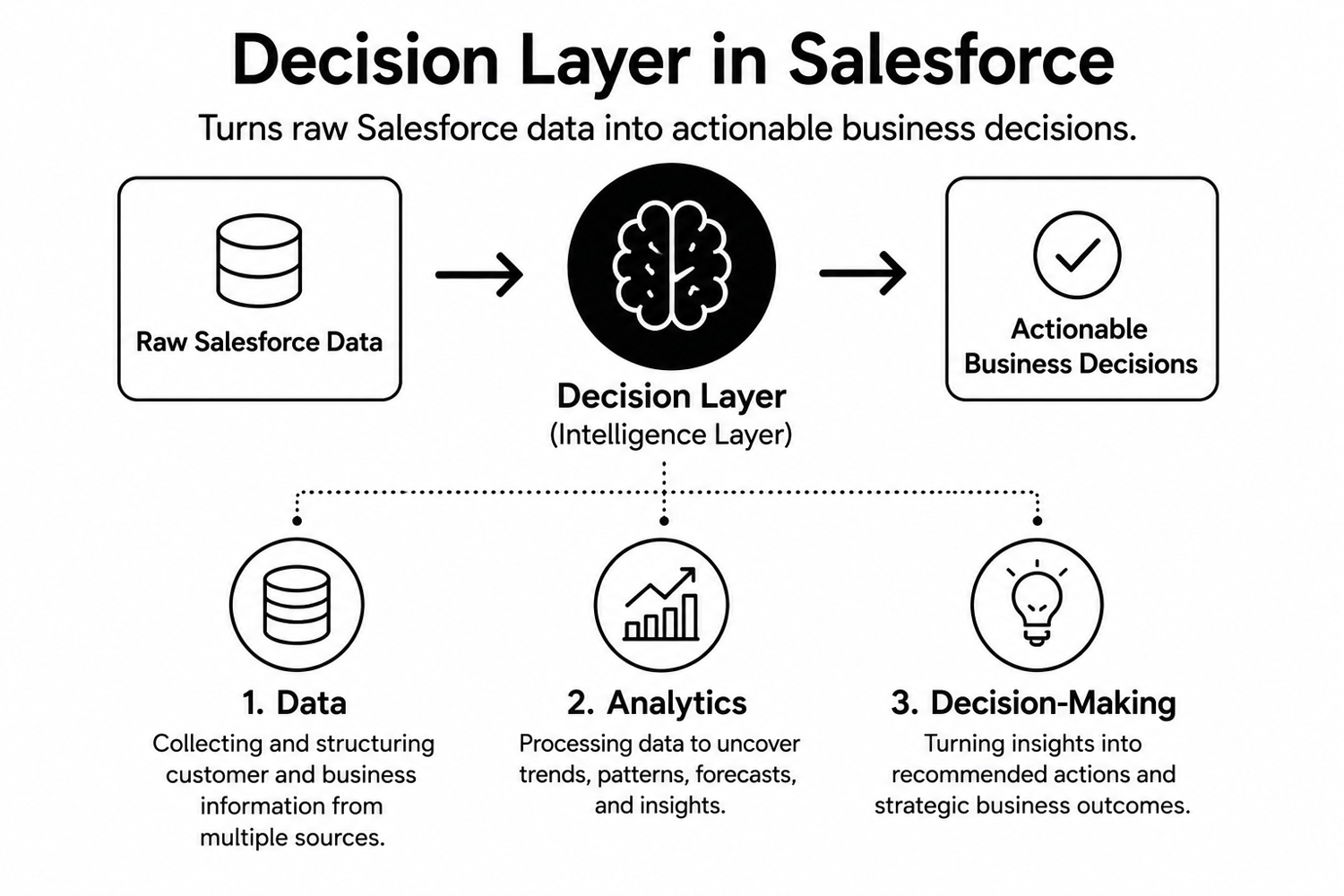 As you can see from this diagram, the Decision Layer focuses on three key areas:
- Data - Collecting and structuring customer and business information from multiple sources.
- Analytics - Processing data to uncover trends, patterns, forecasts, and insights.
- Decision-Making - Turning insights into recommended actions and strategic business outcomes.
Why Revenue Insights Often Fall Short?
Despite using a powerful platform like Salesforce, many businesses struggle to generate meaningful revenue insights because their data and reporting systems are not fully aligned with their business outcomes. Instead of supporting confident decision-making, revenue analytics often become difficult to interpret or disconnected from performance. This prevents their leadership teams from getting a clear understanding of what is driving growth and where improvements are needed.
Revenue insights typically fall short due to:
- Fragmented data across systems: Sales, marketing, finance, and customer data often exist in disconnected tools. This inability to keep Salesforce as the single source of truth for decision-making makes it difficult to achieve a unified view of revenue performance.
- Poor reporting structures: Many reports focus on raw numbers without providing actionable insights or clear next steps for teams.
- Misaligned KPIs: Organisations frequently track activity-based metrics instead of outcome-driven indicators tied to revenue growth and customer success.
- Inefficient dashboards: Complex or cluttered dashboards make it harder for stakeholders to quickly interpret performance and identify trends.
- Lack of real-time insights: Delayed reporting prevents businesses from responding quickly to risks, opportunities, and changing customer behaviour.
Hidden Analytics and Reporting Gaps Most Companies Miss
Another major challenge for revenue insights falling short is the presence of several hidden reporting and analytics gaps that limit visibility and reduce revenue opportunities. Here are some of them:
- Funnel visibility gaps: Businesses fail to track where leads and opportunities drop off in the sales funnel. This makes it difficult to identify bottlenecks and improve conversion rates.
- Poor data structuring: Inconsistent or unorganised customer data reduces the accuracy of customer data analytics and limits the quality of insights generated from reports.
- Delayed insights: Reports are often generated too late, preventing your teams from responding quickly to market changes or customer behaviour trends.
- Underutilised tools: Companies frequently use only basic Salesforce capabilities while advanced reporting and analytics features remain unused.
- Lack of predictive analytics: Without forecasting and AI-driven insights, businesses struggle to make proactive decisions or anticipate future revenue opportunities and risks.
Business Impact of Weak Decision Systems
Without accurate insights and timely reporting, businesses often struggle to make confident and data-driven decisions despite using a platform ike Salesforce. Over time, they experience the following impact on their business:
- Slower deal velocity: Sales cycles become longer due to delayed insights and inefficient processes.
- Lower conversion rates: Teams struggle to identify high-intent opportunities and optimise customer journeys.
- Increased customer acquisition cost (CAC): Poor targeting and inefficient decision-making lead to higher marketing and sales expenses.
- Poor forecasting accuracy: Incomplete or outdated data makes revenue predictions unreliable.
- Revenue unpredictability: Lack of visibility into trends and performance creates inconsistent business growth.
How to Design a Decision Layer on Salesforce?
Designing an effective Decision Layer on Salesforce requires more than building reports and dashboards. It involves creating a connected system where data, analytics, and business intelligence work together to support faster and smarter decision-making. Below are the key steps involved in building a strong Salesforce decision layer.
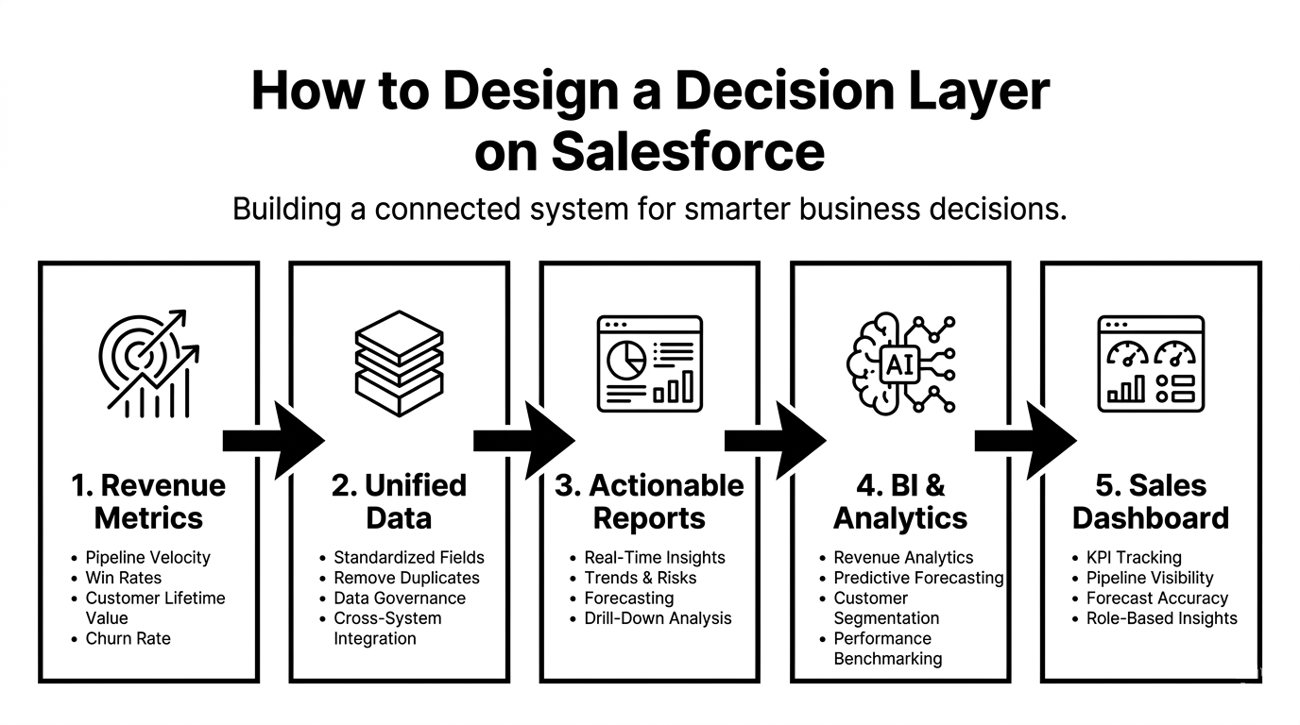 Step 1: Define Revenue-Focused Metrics
The core of an effective decision layer starts with identifying the right metrics. Many businesses track activity-based KPIs such as the number of calls made or emails sent, but these metrics do not always reflect actual business outcomes. Instead, you should focus on revenue-driven indicators such as:
- Pipeline velocity
- Win rates
- Customer lifetime value
- Churn rate
- Deal size
- Revenue growth
Clearly defined metrics help align different teams around common business goals. It also ensures that reporting and analytics are directly tied to measurable outcomes rather than disconnected operational activities.
Step 2: Structure Clean and Unified Data
A Decision Layer is only as strong as the quality of its data. In many organisations, customer and revenue data are fragmented across multiple systems. This makes it difficult to generate accurate insights. Designing a decision layer requires building a clean and unified data environment within Salesforce. This involves:
- Standardising data fields
- Eliminating duplicates
- Improving data governance
- Integrating information from sales, marketing, customer support, and finance systems
- Establishing clear rules for data entry and validation to maintain consistency over time
Clean and unified data creates a single source of truth for your organisation. It improves the accuracy of reporting and ensures that your teams can trust the insights generated from Salesforce dashboards and reports.
Step 3: Build Actionable Salesforce Reports
Traditional reports often provide historical information without helping your teams understand what actions to take next. An effective decision layer focuses on building actionable Salesforce reports that highlight trends, risks, opportunities, and performance gaps in real time.
Reports should be designed around business objectives and user needs. For example, sales leaders may require reports that track pipeline health and conversion bottlenecks, while executives may need revenue forecasting and performance summaries.
Actionable reporting also means simplifying data presentation. Reports should be easy to interpret and focused on key business outcomes. Using filters and drill-down capabilities allows your teams to move from high-level insights to detailed analysis quickly and efficiently.
Step 4: Implement Business Intelligence Tools
Salesforce reporting becomes significantly more powerful when combined with business intelligence tools such as Salesforce Revenue Analytics, Tableau, or integrated AI-powered analytics platforms. These tools help you process large amounts of data and uncover deeper insights that standard reporting alone may not reveal.
Business intelligence solutions offer advanced analytics capabilities such as trend analysis, predictive forecasting, customer segmentation, and performance benchmarking. They also allow you to combine Salesforce data with external business data for a more complete view of operations and revenue performance.
Step 5: Create a Sales Performance Dashboard
A well-designed sales performance dashboard acts as the operational centre of your Decision Layer. It provides your leadership teams and sales managers with real-time visibility into business performance, helping them monitor progress and identify issues before they impact revenue.
An effective dashboard should:
- Focus on clarity and usability. Instead of overwhelming users with excessive data, it should highlight the most important KPIs, sales trends, forecast accuracy, pipeline movement, and team performance metrics.
- Dashboards should also be role-specific. Executives may require high-level business summaries, while sales representatives may need detailed pipeline and activity tracking. Custom dashboards ensure that each user receives relevant insights that support faster and more informed decisions.
When Your Business Needs a Decision Layer: A Simple Checklist
"Not sure whether your business truly needs a Decision Layer yet? This simple checklist can help you identify the common warning signs."
- Your reports show historical data, but your teams still struggle to decide the next best action.
- Sales, finance, customer, and operational data are spread across multiple tools with no unified view.
- Revenue forecasts change frequently because different teams use different assumptions and spreadsheets.
- Dashboards are available, but leadership rarely uses them during real business reviews.
- Your teams spend more time collecting and cleaning data than acting on insights.
- Important business insights arrive too late to influence decisions or outcomes.
- Different departments report conflicting numbers for the same business metrics.
- Managers rely heavily on gut feeling instead of data-backed recommendations.
- Executives cannot easily track KPIs in real time across regions, products, or teams.
- Your business struggles to turn insights into automated workflows, alerts, or next-step actions.
The Next Evolution of Revenue Intelligence
The future of revenue analytics is moving toward faster and more predictive decision-making. Businesses are increasingly adopting AI-driven analytics, predictive revenue insights, automated reporting systems, and real-time data synchronisation to improve visibility across the entire revenue lifecycle.
Intelligent dashboards powered by automation and machine learning will help organisations identify risks, uncover opportunities, and make proactive business decisions instead of reacting to outdated reports. As competition grows, companies that invest in connected and real-time analytics ecosystems will gain a significant advantage in forecasting accuracy and customer engagement.
How Can Brysa Help?
Brysa helps in building a strong Decision Layer that will transform Salesforce into a modern revenue intelligence ecosystem. From implementing advanced Salesforce reports to creating scalable revenue analytics frameworks, we focus on turning your raw business data into actionable insights. Our team also helps in integrating business intelligence tools, streamline reporting structures, and continuously optimise your analytics performance to support long-term growth. By combining Salesforce expertise with strategic analytics execution, we help you make faster and data-driven decisions with greater confidence. Contact us now to know more.