

Every year, we hear the same story—tech leaders promising themselves they’ll “invest smarter” in AI and technology. And every year, budgets quietly disappear into tools that looked powerful on paper but never quite delivered in practice. The real issue isn’t the tools—it’s the lack of clarity on what problems are worth solving and where technology truly adds leverage. This is especially true when working with Salesforce CRM, where businesses can improve deal win rates by up to 24% when systems are implemented correctly. Success depends on getting the fundamentals right—clear CRM Architecture, smart Salesforce Configuration, and purposeful Salesforce Customisation supported by Workflow Automation, seamless Data Integration, and strong Business Process Automation.
Salesforce is known for its incredible flexibility—but with that flexibility comes a major strategic challenge. With tools like Apex Programming and Lightning Web Components (LWC), there are endless ways to customise the platform. The real question is: how much is too much? Every configuration choice or line of code shapes not just your system, but your long-term scalability and costs—often leading to hidden Technical Debt if not managed well. In this article, we’ll break down how to make that call with clarity—when simple configuration is enough, when customisation creates a competitive advantage, and when bringing in an expert makes complete sense.

What Salesforce Configuration Really Means?
Salesforce configuration is all about shaping the platform using declarative and click-based tools. This includes tools like Flows, validation rules, page layouts, profiles, permission sets, and approval processes. These features allow you to adapt Salesforce to your business needs using built-in functionality rather than engineering effort.
Because configuration relies on native platform capabilities, it enables faster deployment with lower risk. Changes can often be implemented in days instead of weeks. They can be tested easily in sandboxes and rolled out with minimal disruption. More importantly, they remain upgrade-safe. This means Salesforce releases are far less likely to break your setup compared to heavy custom code.
When to Configure Salesforce: A Quick Checklist
- Your requirement can be handled using standard objects and relationships.
- Business logic fits naturally into Flows or validation rules.
- Processes are likely to change over time.
- Multiple admins need to manage the system.
- Long-term maintainability matters more than short-term speed.
- You want minimal dependency on developers.
- Platform upgrades must remain smooth.
What Salesforce Customisation Really Means?
Salesforce customisation focuses on extending the platform using programmatic and advanced technical tools. This includes complex Flows, Apex triggers and classes, Lightning Web Components (LWC), Visualforce pages, custom integrations, and complex APIs. These tools allow you to build highly tailored solutions when standard features and declarative tools are no longer sufficient.
Customisation is typically used to support unique business models or industry-specific processes that cannot be achieved through configuration alone. It offers greater flexibility and control. You can design precise logic and custom interfaces that match your exact requirements. However, customisation requires deeper technical expertise and more rigorous governance. Also, development cycles are longer, requiring continuous and ongoing maintenance.
When to Customise Salesforce: A Quick Checklist
- Your requirements cannot be met using standard objects, simple Flows, or validation rules.
- Business logic is too complex for declarative automation.
- You need custom user interfaces or highly tailored user experiences.
- Integration with external systems requires advanced processing.
- Performance optimisation demands custom-built solutions.
- Your workflows are stable and unlikely to change frequently.
- You have access to experienced Salesforce developers.
- Long-term competitive advantage depends on specialised functionality.
Salesforce Customisation vs Configuration: A Practical Comparison
Choosing between configuration and customisation directly impacts how fast you can adapt and how sustainable your Salesforce system remains over time. The table below highlights the key differences between the two models:
|
Factor |
Salesforce Configuration |
Salesforce Customisation |
|
Speed of Change |
Fast to implement and modify using click-based tools |
Slower due to development and deployment cycles |
|
Cost and Effort |
Lower cost with minimal reliance on developers |
Higher cost due to specialised development resources |
|
Scalability |
Scales well for standard and moderately complex processes |
Scales effectively for highly complex and unique business models |
|
Technical Debt Risk |
Low, as changes rely on native platform features |
Higher, due to custom code maintenance and dependencies |
|
Governance & Long-Term Ownership |
Easier to manage through admin-led governance models |
Requires structured development governance and technical oversight |
Where Does Configuration & Customisation Start to Break: Common Mistakes Organisations Make
Both configuration and customisation begin to fail when you treat Salesforce as a quick-fix tool rather than a long-term business platform. Problems usually arise when you prioritise short-term delivery over system health and scalability. Over time, this leads to bloated automations and rising maintenance costs. Instead of enabling growth, your Salesforce ecosystem becomes harder to manage and more expensive to operate.
Here are some other common mistakes made by organisations related to configuration and customisation:
-
Forcing complex business logic into simplistic solutions that were never designed to handle it.
-
Over-customising simple processes that could be handled through standard features.
-
Building solutions without proper documentation or architectural planning.
-
Accumulating technical debt through rushed development and poor code reviews.
-
Allowing multiple admins and developers to make changes without centralised governance.
-
Ignoring performance and security best practices.
-
Treating Salesforce as an IT-only system instead of aligning it with business strategy.
Want a quick way to assess the health of your Salesforce processes? Here is a guide for you: How to Perform a Health Check for Your Salesforce Processes and Metadata
A Simple Decision Framework: When to Configure, Customise, or Seek Help
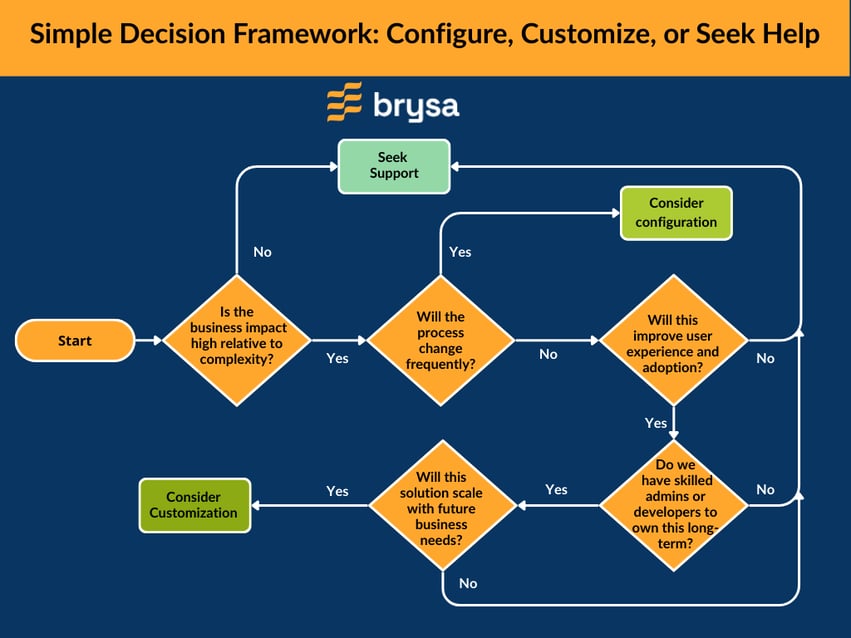
While Salesforce’s flexibility makes it tempting to handle everything in-house, there comes a point where DIY configuration and customisation can do more harm than good. As your systems grow more complex, small mistakes can quickly turn into long-term operational risks. Knowing when to bring in experienced professionals like Brysa helps protect your Salesforce investment and ensures your platform continues to support business growth. It’s time to seek expert help when:
- Your automations or custom code are becoming difficult to understand or maintain.
- System performance is slowing down due to overloaded processes or inefficient logic.
- You’re planning large-scale integrations or multi-system workflows.
- Security or compliance requires advanced implementation.
- Platform upgrades frequently cause unexpected issues or downtime, which, in turn, leads to revenue leakages.
- Business requirements are outpacing your internal team’s technical capabilities.
- User adoption is declining because the system feels confusing or unreliable.
- You’re accumulating unresolved technical debt and recurring support tickets.
- Strategic initiatives depend heavily on Salesforce's reliability and scalability.
Bringing in certified consultants like Brysa at the right time doesn’t mean giving up control. It means strengthening your system with proven architecture and long-term governance, so that Salesforce remains an asset, not a liability for you.
Brysa’s Approach to Salesforce Implementation
At Brysa, our Salesforce implementation services are guided by a business-first mindset rather than short-term technical fixes. Our focus is on building systems that are scalable and aligned with your real operational goals. Instead of rushing into complex development, we make sure every solution is carefully evaluated to ensure it delivers value today while remaining sustainable for your tomorrow. Our approach is built on four core pillars:
- Configuration-First Mindset: We prioritise declarative tools and native features wherever possible. This ensures faster delivery and greater flexibility as your business needs evolve.
- Customisation Only When Justified: We introduce customisation only when the configuration cannot meet functional or performance requirements. Every customisation is reviewed for necessity and long-term ownership.
- Business Outcomes Before Technical Solutions: We start by understanding your processes and growth plans through our consulting services. Solutions are designed around measurable business results and not just technical feasibility.
- Governance and Scalability Built In: From day one, we establish clear governance models and scalable architecture. This prevents system sprawl and ensures smooth handovers and future enhancements.
This balanced approach helps us maximise your Salesforce investment without sacrificing stability or long-term ROI. Contact us to know more about how we can help.